A handlebar display that tracks speed and distance turns a casual ride into a record you can follow over weeks. Commuters logging the same route benefit from seeing pace and mileage without a phone in hand. Your choice comes down to sensor-based accuracy or GPS independence, plus screen size and mount style. That split shapes every pick below, from a simple two-button unit to a GPS model with altitude data.
Hills, night rides, and quick stops each change which features matter most. You can match a model to those moments instead of paying for data that sits unused.
A Quick View Of The Lineup

SY Bicycle Speedometer Odometer Wireless Bike Computer
CATEYE Urban Wireless+ Bike Computer (Black)

BKVTOP Wireless GPS Bike Computer Out-Front Mount

CATEYE Urban Wireless Bike Computer

Wireless GPS Bike Computer Standard Mount 50g

CYCPLUS Wireless GPS Bike Computer G1
A Deeper Look At The Lineup
A small wireless unit suits riders who want speed, distance, and ride time without extra complexity. An odometer, meaning a counter for total distance traveled, keeps a running mileage record across rides. You get a 1.2-inch LCD screen, a handlebar mount, and a speed sensor that pairs with a spoke magnet.
Two buttons handle the menu, and tyre size can be set for common wheel sizes to keep readings aligned. Vibration wakes the display from sleep, and a backlight switches on during evening hours. The honest read is that this setup favors simplicity over hill data, which keeps the handlebar clean for daily use.
Good Reasons To Consider
- Wireless, waterproof design removes cable clutter on the handlebar
- Auto wake from vibration keeps the display ready at ride start
- Two-button controls simplify cycling through ride statistics
- Adjustable tyre sizes support road, mountain, and folding bikes
Things To Consider
- Sensor and magnet placement must stay within the specified distance
- Some electric-assist bikes may not suit this sensor setup
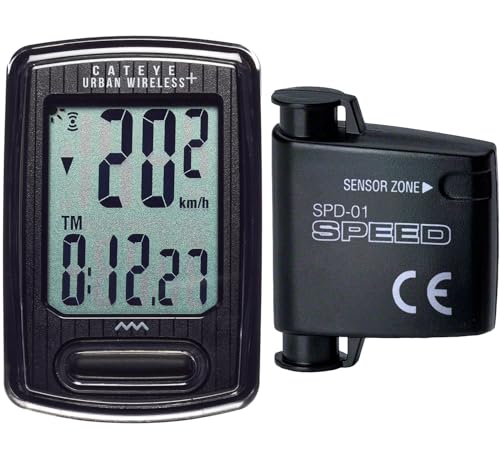
Compared with the SY model, this CATEYE unit adds calorie tracking, a pace arrow, and a programmable odometer. Auto start and stop pauses time and average speed during traffic lights or coffee stops, which matters in city riding. The FlexTight bracket mounts by hand and shifts position without tools.
Backlight with night mode helps after sunset, and the stated battery life reaches one year. A manual odometer setting preserves total mileage across a battery change. You may find the extra stats most useful on regular commutes, where consistent records build a clearer picture over time.
Bright Spots
- Current, max, and average speed plus trip and total distance
- Auto start and stop handles frequent urban stops cleanly
- FlexTight mount adjusts by hand for different handlebar shapes
- Programmable odometer keeps lifetime mileage after battery swaps
- Backlit display supports evening rides
Worth Noting
- Wheel sensor and magnet need correct alignment for accurate readings
- Analog wireless connection suits standalone use rather than app pairing
Who It Suits Best
Urban commuters and gravel riders who want calorie data and a mount that moves between bikes.
Where Another Pick Suits Better
BKVTOP Wireless GPS Bike Computer Out-Front Mount suits riders who want altitude and gradient without a wheel sensor.
Built-in GPS, meaning satellite positioning for speed and distance, removes the need for a spoke magnet. You see current, average, and maximum speed, ride distance, ride time, and total mileage on a 2.4-inch LCD. Temperature, altitude, gradient, and accumulated ascent add context for hilly routes.
At 50 grams, the unit stays light on the bars, and the rechargeable battery runs up to 28 hours. IPX7 is a waterproof rating for rain exposure, and the green auto backlight aids low-light reading. An extended out-front mount places the screen ahead of the handlebar for a clearer view.
The Value In It
- GPS tracking works without wheel sensor or spoke magnet
- Altitude, gradient, and ascent data support hill planning
- 2.4-inch screen keeps key numbers easy to scan
- USB-C charging with up to 28 hours of runtime
Trade Offs
- Out-front mount adds reach ahead of the handlebar, so cockpit space matters
- GPS positioning suits outdoor riding rather than indoor trainer use
- Standalone design focuses on onboard data rather than external sensors
This CATEYE model shares much with the Urban Wireless+ version, including calorie tracking and a programmable odometer. Auto start and stop pauses timing during stops, and a battery indicator gives a heads-up before power runs low. Simple tyre size adjustment keeps distance readings aligned with the wheel in use.
FlexTight mounting fits almost any bike and moves by hand between frames. You can set total mileage manually, so a battery change does not erase a long-term record. In our view, the appeal sits in straightforward setup for riders who want fitness stats without GPS complexity.
Notable Upsides
- Calorie consumption tracking supports fitness-focused riding
- Programmable odometer preserves mileage across battery changes
- FlexTight bracket fits a wide range of handlebar shapes
Minor Gripes
- Wheel sensor distance must be checked during installation
- No altitude or gradient data compared with GPS models
- Battery indicator helps planning, yet replacement timing still needs attention
The standard-mount version of the BKVTOP GPS computer keeps the same 50-gram body and 2.4-inch screen as the out-front version. GPS provides speed, distance, ride time, and total mileage without a wheel sensor, and altitude plus gradient data help on rolling routes. You get MPH or KMH selection, auto start and stop, and a green auto backlight.
Rechargeable power runs up to 28 hours through a USB-C cable, and IPX7 waterproofing supports rainy commutes. The standard mount suits cockpits with limited space ahead of the bars. Depending on your route, the smaller footprint can feel cleaner than an extended mount.
Why It Works Well
- GPS data without sensor or magnet installation
- 50-gram weight keeps the front end light
- Standard mount fits tighter handlebar setups
- Temperature, altitude, and ascent data for route awareness
Points To Note
- Standard mount positions the screen closer to the bars than an out-front mount
- Standalone GPS design does not connect to external sensors
Made For
Commuters and leisure riders who want GPS data on a compact, standard mount.
Consider Something Else When
CYCPLUS Wireless GPS Bike Computer G1 suits riders who prioritize longer runtime over the lightest weight.
A 2.0-inch screen with FSTN technology, a display type designed for sunlight readability, sets this GPS model apart from the larger BKVTOP screens. Tempered glass covers the display, and IPX6 waterproofing supports riding in rain. GPS data includes ride time, distance, total time, total mileage, clock, and current altitude.
Weight sits at 70 grams, higher than the 50-gram BKVTOP units, yet the 1200mAh battery runs for more than 55 hours. Sleep mode starts after 10 minutes of inactivity and shows the last ride data on waking. You can stretch charging intervals for touring or frequent weekly rides.
Practical Pluses
- 1200mAh battery supports more than 55 hours of use
- Sunlight-readable screen with tempered glass cover
- GPS positioning with altitude and total mileage
- Auto sleep preserves the last ride view
Small Caveats
- 70-gram weight adds more than the 50-gram GPS options
- 2.0-inch screen shows less data at once than a 2.4-inch display
What Matters Most Before Choosing a Handlebar Computer
Sensor Accuracy Versus GPS Independence
A wheel sensor measures rotations directly, so tyre size settings shape distance accuracy. GPS calculates speed and distance from satellite signals, which removes magnet alignment from the setup. You can weigh that trade-off against cockpit space, since a sensor needs a clean run from wheel to fork.
Screen Size and Mount Position
A larger screen, such as 2.4 inches, shows more numbers during a quick glance. A standard mount keeps the unit close to the bars, while an out-front mount moves the view ahead of cables and accessories. Glare matters too, so a sunlight-readable display helps on bright, open roads.
Battery and Ride Pattern
Long rides reward a larger rechargeable battery, such as the 1200mAh cell in the CYCPLUS G1. Short daily commutes place less pressure on runtime, and a one-year battery life in the CATEYE models reduces charging routines. Auto start and stop also matters in town, where stops would otherwise distort average speed.
Data That Matches the Route
Altitude, gradient, and accumulated ascent suit hilly routes and longer tours. Calorie tracking suits fitness-focused riders who care about effort over elevation. Matching the data set to the route keeps the display useful instead of crowded.
Key Considerations Across These Picks
Common Shopping Slip Ups
Shoppers often overlook mount clearance and sensor distance during setup. Checking handlebar space and wheel size before ordering prevents a poor fit. A quick measure of the cockpit saves more time than adjusting a mount mid-ride.
What The Higher Tier Buys
Higher-tier GPS models add altitude, gradient, and longer battery life for touring. The extra cost makes sense for riders who track hills or ride for hours at a stretch. Simple sensor models remain a smart match for short, flat commutes.
Frequently Asked Questions
Does a wireless bike computer need a wheel sensor?
Sensor-based models need a magnet and sensor for speed and distance. GPS models track speed and distance from satellite signals without those parts.
Which option suits a daily commute with traffic stops?
Auto start and stop helps keep averages honest during lights and stops. The CATEYE models pause timing while stopped, which suits stop-start city routes.
Can the display be read at night?
Most picks here include a backlight for low-light rides. The BKVTOP models use a green auto backlight, while the SY unit lights on button press during evening hours.
How does tyre size affect distance readings?
Sensor models use tyre size to convert wheel rotations into distance. Setting the correct size for the wheel in use keeps mileage aligned with the actual route.
Which mount style fits a crowded cockpit?
A standard mount keeps the computer close to the handlebar. An out-front mount needs clear space ahead of the bars for the extended bracket.
Closing Remarks
Sensor models from CATEYE and SY keep setup simple for flat, regular routes. GPS models from BKVTOP and CYCPLUS add altitude data and remove magnet alignment. Match the mount, screen, and battery to the rides ahead, and the right pick becomes clear.